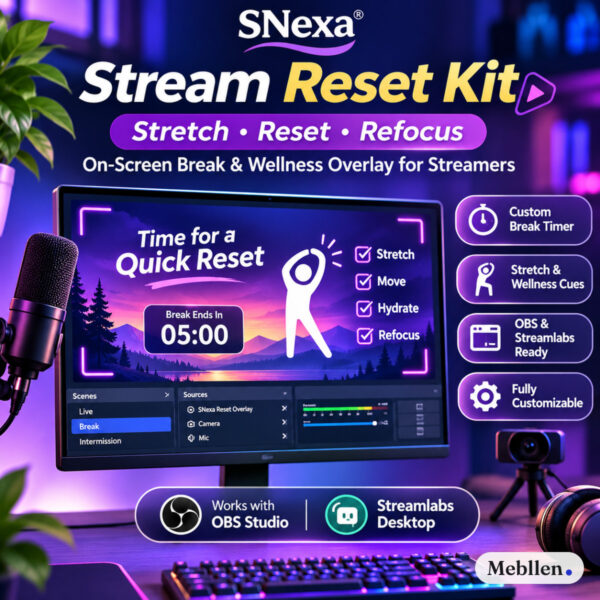
Stretch break overlay that keeps you and your chat moving
What is Stream Reset Kit? Stream Reset Kit is an offline stretch break overlay for OBS Studio and Streamlabs. It counts down to your next break, then shows an animated, step-by-step routine on stream so you and your chat can stretch together — plus break scenes, a coach timer for teams and a printable desk pack.
Long sessions are hard on hands, wrists, neck, back and eyes. Stream Reset Kit turns healthy breaks into part of the show. One-time payment. No subscription. No account.
The problem
- You sit for hours without moving — breaks get skipped when the game or chat is busy.
- Wrists, forearms, neck and eyes feel tight after long sessions and grinding nights.
- Stepping away from the camera feels like losing viewers.
- Generic stretch videos don’t fit into a live stream or a 2-minute queue.
- Coaches and team leads have no simple way to run warm-ups and resets for the whole roster.
How Stream Reset Kit solves it
| Problem | Our solution |
|---|---|
| Forgetting to take breaks | On-stream countdown that warns you, then starts the break automatically every 20–90 minutes. |
| Not sure what to do on a break | Animated move cards with a timer, simple cue and “next move” — just follow along. |
| Losing viewers during breaks | “Stretch with me” chat banner, chat commands and full-screen break scenes keep chat engaged. |
| Different games, different strain | Genre warm-up presets for FPS, fighting games, MOBA/RTS, mobile/handheld and racing sims. |
| Overlay doesn’t match your brand | 10 skins plus custom accent color, size, position and text. |
| Teams skip warm-ups | Coach Pack — practice block timer with full-screen reset rounds and a team habit sheet. |
| Desk setup causing strain | Setup Fit calculator for chair, desk and screen height and distance. |
| Habits don’t stick | 30-day challenge, session log and streak counter. |
What you get — features
- Break timer overlay for OBS Studio and Streamlabs, with countdown pill and 30-second warning
- 28 animated moves for hands, wrists, forearms, neck, shoulders, back, hips, legs and eyes
- 11 ready routines — 60-second reset, 3-minute reset, 5-minute warm-up, 10- and 15-minute recovery, eye reset and 5 genre presets
- 10 overlay skins with custom accent color, position, size and text
- OBS triggers — start a break by switching to a scene, or with hotkeys and Stream Deck
- 5 full-screen break scenes — stretch break, eye reset, hydration, back in 60 and a transition card
- Chat Command Pack — ready replies for !stretch, !water, !eyes, !posture, !hands, !break, plus timer messages
- Panel & banner generator — Twitch panels and a full-screen BRB image as PNG
- Coach Pack — practice block timer, team reset rounds and team habit sheet
- Print Pack — desk poster, monitor cue cards, team rules poster and habit sheet (Letter, A4, A3)
- Setup Fit calculator for chair, desk and screen
- 30-Day Stream Reset Challenge with badges, shareable progress card and certificate
- Session log with streak counter and CSV export
Get Stream Reset Kit
One-time payment · Instant download
Benefits
- Take breaks without thinking — the overlay reminds you and runs the routine for you.
- Feel looser after long sessions — short, regular movement for the areas gaming loads most.
- Keep chat engaged — breaks become a shared moment, not dead air.
- Look professional — on-brand skins, scenes and panels.
- Build a lasting habit — streaks, challenge and session log.
- Help your whole team — run warm-ups and reset rounds for everyone at once.
- Pay once — no subscription, works offline.
How it compares
| Stream Reset Kit | Premium overlay packs | Subscription fitness / ergonomics apps | |
|---|---|---|---|
| Break timer on stream | ✔ | ✘ Visuals only | ✘ |
| Guided stretch routines | ✔ 28 moves, 11 routines | ✘ | ✔ Not built for streams |
| Chat engagement tools | ✔ Banner, commands, scenes | Varies | ✘ |
| Team / coach tools | ✔ Coach Pack | ✘ | Rarely |
| Works offline, no account | ✔ | Varies | ✘ Account needed |
| Cost | One-time, low price | One-time | Monthly fees |
Get Stream Reset Kit — one-time payment
One-time payment · Instant download
Included in the download
- Stream Reset Kit app — Studio, overlay, scenes, coach and print modes in one
- Setup Guide (18-page PDF with screenshots)
- Routine Handbook (25-page illustrated PDF with trackers)
- Quick Start card (PDF)
- Bonus 1: Coach Handbook — scripts, schedules and templates for teams (PDF)
- Bonus 2: Bonus Guide — genre presets, panels, chat commands, Setup Fit and 30-day challenge (PDF)
- License & terms (PDF)
Who it is for
Twitch, YouTube and Kick streamers, content creators, competitive and casual gamers, and esports coaches, captains, clubs and school or college labs who want healthier sessions without breaking the flow.
Works with streaming software on Windows and Mac computers. Not for phones or tablets. General movement and break-habit guidance for education only — not medical advice. Stop and see a qualified professional if you feel pain, numbness, tingling or dizziness. OBS Studio, Streamlabs and Stream Deck are trademarks of their owners; not affiliated.
About SNexa
SNexa makes offline, privacy-first software tools for creators, professionals and families — no subscriptions, no cloud accounts. Browse more SNexa tools or all offline apps on Mebllen.
Frequently asked questions
Does it work with OBS Studio and Streamlabs?
Yes. You add the overlay as a Browser Source in OBS Studio or Streamlabs Desktop by pasting the URL the app gives you. The Setup Guide walks you through it with screenshots.
Does it need the internet or an account?
No. Stream Reset Kit runs fully offline. No account, no login, no tracking.
Will the overlay slow down my stream?
It is a lightweight browser source with simple animations. It does not connect to any server.
Can I control breaks during a live stream?
Yes. Use hotkeys in the OBS Interact window (start, skip, pause, end), click the countdown pill, or set a scene keyword so switching to your “Break” scene starts the routine automatically.
Can my chat join in?
Yes. The break card shows a “stretch with me” banner, and the Chat Command Pack gives you ready replies for !stretch, !water, !eyes, !posture and more.
Can I change the look?
Choose from 10 skins, set your own accent color, position, size, break title and banner text.
Is it only for streamers?
No. Gamers who don’t stream can run the Coach timer or routines on their own screen, and coaches can run reset rounds for a whole team.
Can I use it on monetized streams and VODs?
Yes. You can show the overlay and scenes on your own live streams, recordings, VODs and clips, including monetized ones.
Does it work on phones or tablets?
The overlay is built for streaming software on a Windows or Mac computer. It is not designed for phones or tablets.
Is this medical advice?
No. It gives general movement and break-habit cues for education only. Move in a comfortable range and stop if anything hurts, tingles or goes numb.
Is it a subscription?
No. One-time payment. No monthly fees.
Start your first stretch break today
One-time payment · Instant download




Reviews
There are no reviews yet.