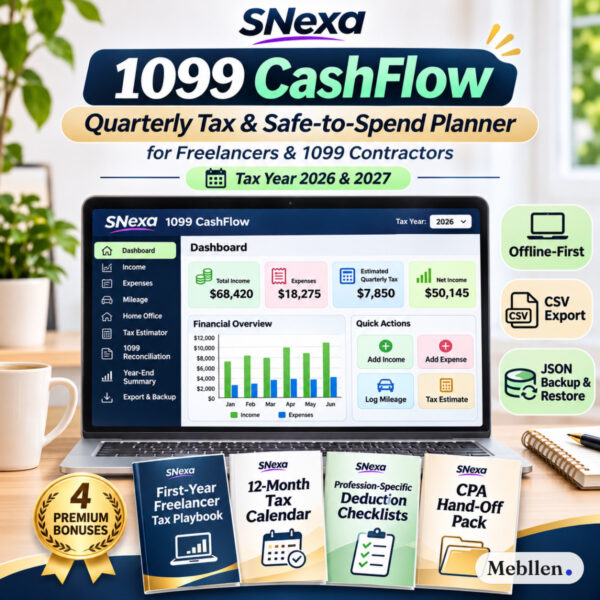
Freelancer tax software that tells you what’s safe to spend
What is SNexa 1099 CashFlow? SNexa 1099 CashFlow is offline freelancer tax software for US 1099 contractors. Every time you get paid, it shows how much to set aside for taxes and how much is safe to spend — then plans your quarterly estimated payments, tracks expenses and mileage, checks your 1099 forms and builds a year-end summary for your CPA. One-time payment, no subscription, no bank login.
The problem
- No employer withholds tax for you — so the money in your account isn’t all yours.
- You don’t know how much to set aside, and April brings a surprise tax bill.
- Quarterly estimated taxes are confusing — how much, when, and what happens if you skip one?
- Underpayment penalties quietly build up when payments are late or short.
- Expenses, mileage and 1099 forms end up scattered across apps, emails and receipts.
- Your CPA asks for everything at once, and you pay for the hours spent sorting it out.
How 1099 CashFlow solves it
| Problem | Our solution |
|---|---|
| Not sure how much is yours | Safe-to-spend split — log a payment and instantly see “set aside” vs “safe to spend”. |
| Surprise bill in April | Personal set-aside rate based on your income, expenses, filing status, W-2 job and state. |
| Quarterly taxes are confusing | Quarterly planner with due dates, amount to pay and safe-harbor minimum (90% / 100% / 110% rules). |
| Penalty risk | Payment risk meter showing how far behind the IRS schedule you are today. |
| Scattered expenses and miles | Schedule C expense tracker, mileage log and simplified home office. |
| 1099s that don’t match | 1099 Check — which payers should send a form, what arrived and where the numbers differ. |
| Tax-time scramble | Year-End Summary — Schedule C-style totals and payments, printable as PDF for your CPA. |
| Privacy worries | Works 100% offline. No bank login, no account, optional PIN lock. |
What you get — features
- Safe-to-spend split on every payment, with a quick-split calculator
- Personal set-aside rate that updates as you log income and expenses
- Federal tax estimate — self-employment tax, income tax, QBI deduction, standard or itemized deduction
- Quarterly estimated tax planner with due dates, safe-harbor or pay-as-you-go strategy
- Payment risk meter and payment log with confirmation numbers
- Income log with platform fees and form type (1099-NEC, 1099-K, 1099-MISC)
- Expense tracker by Schedule C line, business-use % and 50% meals rule
- Mileage log at the IRS standard rate and simplified home office deduction
- 1099 Check — expected vs received forms with mismatch alerts
- Year-End Summary — printable Schedule C-style report for your tax preparer
- Tax Years 2026 and 2027, each with its own profile
- W-2 + side income support, state set-aside and safety buffer
- CSV export, backup and restore, PIN lock, light and dark mode
- 3 demo freelancers to explore before you start
Get 1099 CashFlow
One-time payment · Instant download
Benefits
- Spend without guilt — you always know which money is really yours.
- No April shock — the tax money is already set aside.
- Avoid underpayment penalties — know what to pay each quarter and when.
- Keep more of what you earn — capture expenses, mileage and home office deductions.
- Save CPA time — hand over a clean summary instead of a shoebox.
- Stay private — no bank connection, nothing uploaded.
- Pay once — no monthly subscription.
How it compares
| 1099 CashFlow | Subscription bookkeeping / tax apps | Paying a CPA for planning | |
|---|---|---|---|
| Safe-to-spend on every payment | ✔ | Varies | ✘ |
| Quarterly estimates + safe harbor | ✔ | Varies | ✔ Billed by the hour |
| 1099 form check | ✔ | Rarely | ✔ |
| No bank login needed | ✔ | ✘ Usually linked | — |
| Works offline, data stays with you | ✔ | ✘ Cloud | — |
| Cost | One-time, low price | Monthly fees | Hourly fees |
1099 CashFlow doesn’t replace your tax professional. It keeps you organized and on track all year, so their time goes further.
Get 1099 CashFlow — one-time payment
One-time payment · Instant download
Included in the download
- SNexa 1099 CashFlow app — 2026–27 Edition
- User Guide (29-page PDF with screenshots)
- Quick Start card (PDF)
- Bonus 1: The First-Year Freelancer Tax Playbook (20-page PDF)
- Bonus 2: The 12-Month Tax Calendar — printable (PDF)
- Bonus 3: Deduction Checklists by Profession (PDF)
- Bonus 4: The CPA Hand-off Pack — fill-in template (PDF)
Who it is for
US freelancers, independent contractors, consultants, designers, writers, developers, creators, rideshare and delivery drivers, and anyone with a side hustle who gets paid without tax withheld.
Works on computers, tablets and phones. Estimates for planning only — not tax, legal or accounting advice. Not affiliated with or endorsed by the IRS. Confirm with IRS.gov or a tax professional before paying or filing.
About SNexa
SNexa makes offline, privacy-first software tools for freelancers, professionals and families — no subscriptions, no cloud accounts. Browse more SNexa tools or all offline apps on Mebllen.
Frequently asked questions
Who is 1099 CashFlow for?
US freelancers, independent contractors, gig workers, creators and side hustlers who get paid on 1099s (or with no form at all) and need to plan quarterly estimated taxes.
Which tax years does it cover?
Tax Year 2026 and 2027 planning. 2027 uses 2026 figures where the IRS has not yet published new values, which slightly overstates tax (the safer side). The app shows exactly which figures are used.
Does it file my taxes or pay the IRS?
No. It estimates what to set aside and what to pay each quarter. You pay through IRS Direct Pay, your IRS Online Account or EFTPS, then record the payment in the app.
Does it connect to my bank?
No. There is no bank login and no account. You log payments yourself in seconds — your financial data never leaves your device.
Does it work offline?
Yes. It runs fully offline in your web browser after download. No internet, no subscription, nothing uploaded.
Can I use it on my phone?
Yes. It works on Windows, Mac, Chromebook, iPhone, iPad and Android in Chrome, Edge, Firefox or Safari. Data stays on the device you use, so pick one main device or move data with the backup file.
Does it handle state taxes?
It adds a state set-aside using the rate you enter (0% for states with no income tax). Check your state’s own estimated tax schedule.
What if I also have a W-2 job?
Enter your W-2 wages and withholding. The app counts them in your tax estimate and reduces what you need to set aside.
How do I back up my data?
Settings → Backup creates a file you can save anywhere. Restore it on any device. You can also export CSV files for your CPA.
Is this tax advice?
No. 1099 CashFlow gives estimates for planning only. It is not affiliated with or endorsed by the IRS. Confirm with IRS.gov or a tax professional before paying or filing.
Is it a subscription?
No. One-time payment. No monthly fees.
Start planning your quarterly taxes today
One-time payment · Instant download





Reviews
There are no reviews yet.